
NetMirror for Smart TV – Watch on Android TV & Google TV
NetMirror for Smart TV lets you enjoy movies, web series, anime, and TV shows on a larger screen. Android TV and Google TV devices can support APK installation, depending on the device and its security settings.
The installation method depends on your TV operating system, so check your TV platform before downloading an APK.
NetMirror Smart TV Compatibility
| TV Platform | Direct APK Install | Recommended Method |
|---|---|---|
| Android TV | Yes | APK |
| Google TV | Yes | APK |
| Sony Android/Google TV | Yes | APK |
| Xiaomi / Mi Android TV | Yes | APK |
| TCL Android/Google TV | Yes | APK |
| Hisense Android/Google TV | Yes | APK |
| Amazon Fire TV | Sideloading supported | TV-compatible APK |
| Samsung Tizen | No | Screen mirroring / compatible streaming device |
| LG webOS | No | Screen mirroring / compatible streaming device |
The exact operating system matters more than the TV brand. For example, some Hisense models use Android/Google TV while others use VIDAA, so installation options can differ between models.
How to Install NetMirror on Android Smart TV
If your television runs Android TV or Google TV and supports APK sideloading, follow these steps.
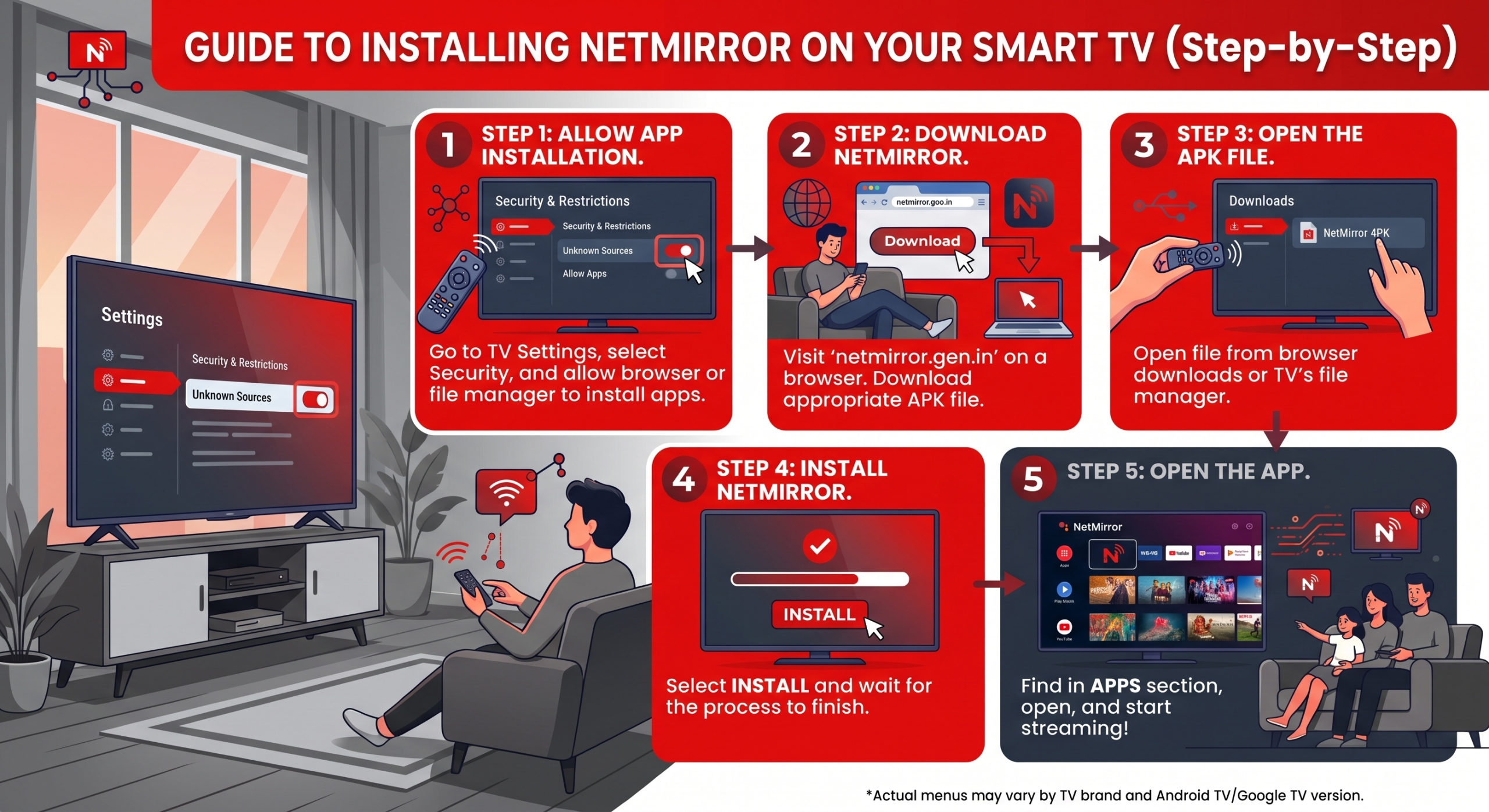
Install NetMirror Using a USB Drive
Some TVs have poor browsers or do not allow APK downloads through the browser.
In that case:
- Download the NetMirror APK from netmirror.gen.in on your computer.
- Copy the APK file to a USB drive.
- Connect the USB drive to your Android TV.
- Open the USB drive using a file manager.
- Select the NetMirror APK.
- Allow installation from the file manager if asked.
- Select Install.
USB installation is only useful on TV operating systems that support Android APK packages.
Can I Install NetMirror on Samsung Smart TV?
Not as an Android APK on standard Samsung Smart TVs.
Samsung Smart TVs use Tizen OS, and Android APK files cannot be directly installed on Tizen. Current NetMirror TV guides recommend screen mirroring/casting or connecting an Android-based streaming device instead.
You can therefore use an Android phone to mirror compatible content to the TV, or connect a supported Android/Google TV or Fire TV device through HDMI.
Can I Install NetMirror on LG Smart TV?
Standard LG Smart TVs use webOS, which does not directly install Android APK files.
If your LG TV does not provide a compatible NetMirror application, use screen mirroring/casting from another device or connect an Android-based streaming device.
Android TV vs Samsung & LG
The important difference is the operating system.
Android TV and Google TV are Android-based and can support APK sideloading. Samsung Tizen and LG webOS use different application formats, so an Android APK cannot simply be installed on them.
This distinction should be clear on your page because simply saying “NetMirror works on all Smart TVs” would be misleading.
NetMirror Not Installing on Smart TV?
First check whether your TV actually runs Android TV or Google TV.
If it does, check whether installation permission has been enabled for the browser or file manager you are using.
If the APK downloads but you cannot find it, open your TV’s file manager and check the Downloads folder. Current Android TV installation guides also suggest transferring the APK from another device when the TV browser cannot handle the download.
If installation succeeds but navigation is difficult, the APK may not be fully optimized for remote control. In that situation, use a TV-specific build if you provide one. Also try Netmirror on PC for standalone experience.
FAQs
Can I install NetMirror on a Smart TV?
It depends on the operating system. Android TV and Google TV can support APK sideloading. Samsung Tizen and LG webOS do not directly install Android APK files.
Does NetMirror work on Android TV?
Current NetMirror documentation provides APK-based installation instructions for Android TV and Google TV devices.
Can I install NetMirror on Google TV?
Yes, Google TV is Android-based. APK installation can be possible when installation from the relevant external source is permitted.
Why is the NetMirror APK not installing on my Samsung TV?
Samsung Smart TVs normally run Tizen rather than Android. Android APK files are therefore not directly compatible with the TV operating system.
Does NetMirror work on LG webOS?
An Android APK cannot be directly installed on standard LG webOS. Casting/screen mirroring or an external compatible streaming device is the practical alternative.
Can I transfer NetMirror APK from my PC to TV?
Yes, on a compatible Android-based TV. You can download the APK on a computer, move it to a USB drive, and open it through the TV’s file manager.